

Overview #
The WhatsApp Sales Closer is a conversion-focused automation system designed for WooCommerce/WordPress stores. Its primary goal is to recover abandoned checkouts, increase Cash on Delivery (COD) confirmation rates, prevent fake orders, and maximize ROI by engaging customers instantly on WhatsApp at key buying moments.
This system acts like a virtual sales agent that tracks user behavior, scores buyer intent, applies smart discounts, and triggers personalized WhatsApp messages using Twilio.
Core Problems This Feature Solves #
Every day, customers add products to their cart but leave without buying. This is called cart abandonment. In WooCommerce stores, 70-80% of carts are abandoned – that’s a massive amount of lost revenue.
- High checkout abandonment rates
- Fake or non-serious COD orders
- Low response rate from email/SMS follow-ups
- No visibility into WhatsApp-driven ROI
- Manual sales follow-ups consuming team time
High-Level Flow (Customer Journey) #
- Visitor views product → enters checkout
- Phone number is captured early
- User behavior is tracked in real time
- If checkout is abandoned → WhatsApp follow-up triggers
- If COD selected → COD Shield validation applies
- Buyer intent is scored
- Smart discount may be offered
- Customer completes purchase via WhatsApp nudging
- Conversion & ROI are tracked
Install & Activate #
- Upload the plugin to your WordPress site
- Activate from Plugins → Installed Plugins
- WooCommerce must be active
Connect Twilio WhatsApp #
- Go to CODShield AI Premium → WhatsApp Sales Closer
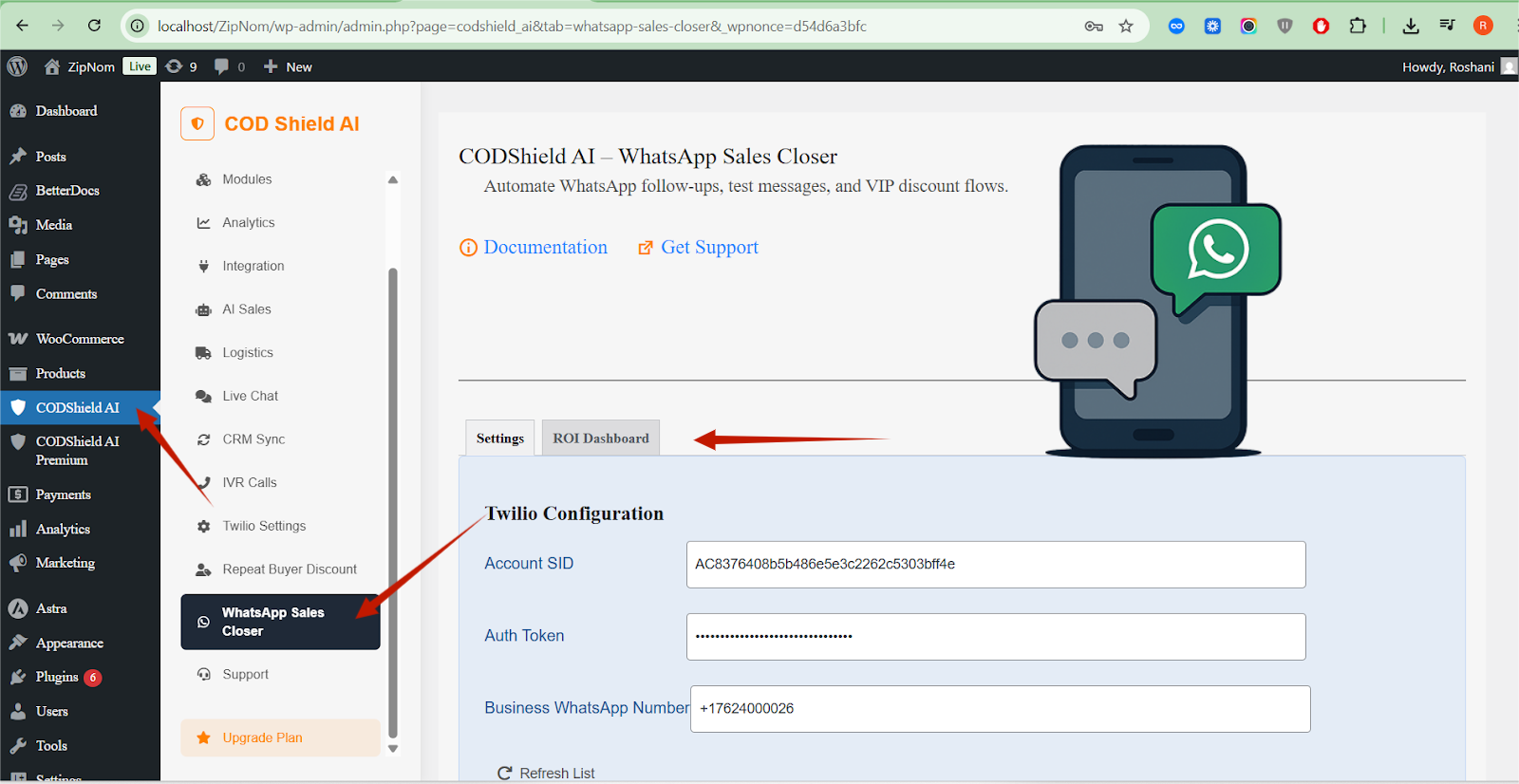
- Enter your Twilio Account SID and Auth Token
- Enter your Twilio WhatsApp Business Number
- Click Test Connection – you should see “Connected”
Configure Basic Settings #
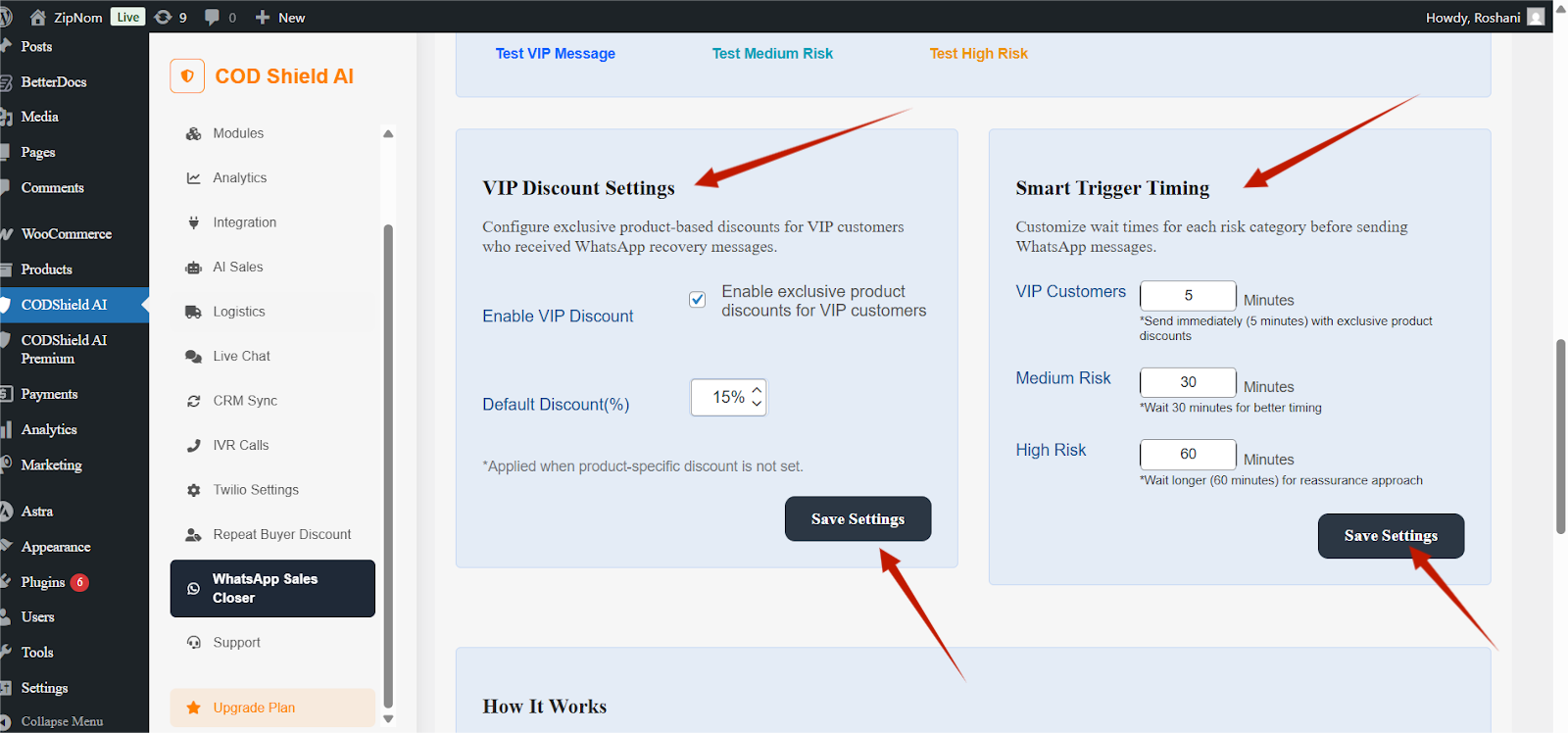
- Set VIP discount percentage (default: 15%)
- Set wait times (defaults work great!)
- Save your settings
Test Your Setup #
- Enter your test phone number
- Click Test VIP Message
- Check your WhatsApp – you should receive a test message
✅ You’re now ready to recover abandoned carts!
Setting Up Twilio WhatsApp #
What is Twilio? #
Twilio is the service that powers WhatsApp Business messaging. Think of it as the bridge between your WooCommerce store and your customers’ WhatsApp.
What You Need #
| Item | Where to Find It |
| Account SID | Twilio Console Dashboard |
| Auth Token | Twilio Console Dashboard (hidden by default) |
| WhatsApp Number | Twilio → Phone Numbers → WhatsApp-enabled number |
Step-by-Step Setup #
1. Create a Twilio Account #
- Go to twilio.com
- Sign up for a free trial (includes $15 credit)
- Verify your email and phone number
2. Get WhatsApp Access #
- In Twilio Console, go to Messaging → Try it out → Send a WhatsApp message
- Join the WhatsApp Sandbox
- Save your sandbox number (usually +14155238886)
3. Copy Your Credentials #
- Account SID: Long string starting with “AC…”
- Auth Token: Long string, click “Show” to reveal
- WhatsApp Number: Your sandbox or approved number
4. Enter in Plugin #
text
- Account SID: AC8376408b5b486e5e3c2262c5303bf4fe
- Auth Token: ••••••••••••••••
WhatsApp Number: +14155238886
5. Test Connection #
Click Twilio Test Connection – you should see:
text
- ✅ Account authentication successful
- ✅ WhatsApp Business Number: +14155238886
✅ Connected
Understanding Customer Risk Scoring #
What is UBS? (User Behavior Scoring) #
UBS is our AI-powered system that predicts how likely a customer is to complete their purchase. Each customer gets a score from 0% to 100%.
The Three Customer Categories #
text
- ┌─────────────────────────────────────────────────────────────┐
- │ VIP CUSTOMERS (70-100%) │
- │ ⭐⭐⭐⭐⭐ – Your best customers │
- │ • Have purchased before │
- │ • Spend ₹2000+ on average │
- │ • Shop from tier 2/3 cities │
- │ • ACTION: Send immediately with VIP discount │
- ├─────────────────────────────────────────────────────────────┤
- │ MEDIUM RISK (40-69%) │
- │ ⭐⭐⭐ – Occasional shoppers │
- │ • New customers with potential │
- │ • Medium-value carts │
- │ • ACTION: Wait 30 minutes, send standard message │
- ├─────────────────────────────────────────────────────────────┤
- │ HIGH RISK (0-39%) │
- │ ⭐ – Price-sensitive shoppers │
- │ • First-time visitors │
- │ • Low-value carts │
- │ • High-risk locations │
- │ • ACTION: Wait 60 minutes, send assistance message │
└─────────────────────────────────────────────────────────────┘
How Scores Are Calculated #
We analyze 4 factors to determine each customer’s score:
1. Order History (40% weight) #
- How many orders? 10+ orders = VIP, 2-5 orders = Medium, 0-1 = High
- How much do they spend? ₹5000+ avg = VIP, ₹1000-2000 = Medium, <₹1000 = High
- When did they last buy? Within 30 days = VIP, 30-90 days = Medium, 90+ days = High
2. Location (30% weight) #
- Low Risk (VIP): Tier 2/3 cities, smaller towns
- Medium Risk: Chennai, Kolkata, Bangalore
- High Risk: Mumbai, Delhi, certain pincodes
3. Site Behavior (20% weight) #
- Frequent visitor: 5+ abandoned carts this week = Engaged
- Occasional visitor: 2-5 abandoned carts = Standard
- First-time visitor: 0-1 abandoned carts = New
4. Cart Value (10% weight) #
- ₹5000+: High intent, serious buyer
- ₹2000-4999: Medium-high value
- ₹500-1999: Standard purchase
- <₹500: Low commitment, possibly testing
How to See Customer Scores #
Currently, scores are used internally for message timing. Future updates will include customer scoring visible in the admin panel.
VIP Discount System #
What Are VIP Discounts? #
Exclusive discounts automatically applied when VIP customers click the WhatsApp recovery link. This creates urgency and rewards your best customers.
Two Ways to Set Discounts #
Option 1: Global Discount (Default) #
Applied to all products when no specific discount is set.
Default Discount: 15% OFF
Set this in WhatsApp Sales Closer → VIP Discount Settings
Option 2: Product-Specific Discount #
Different discounts for different products.
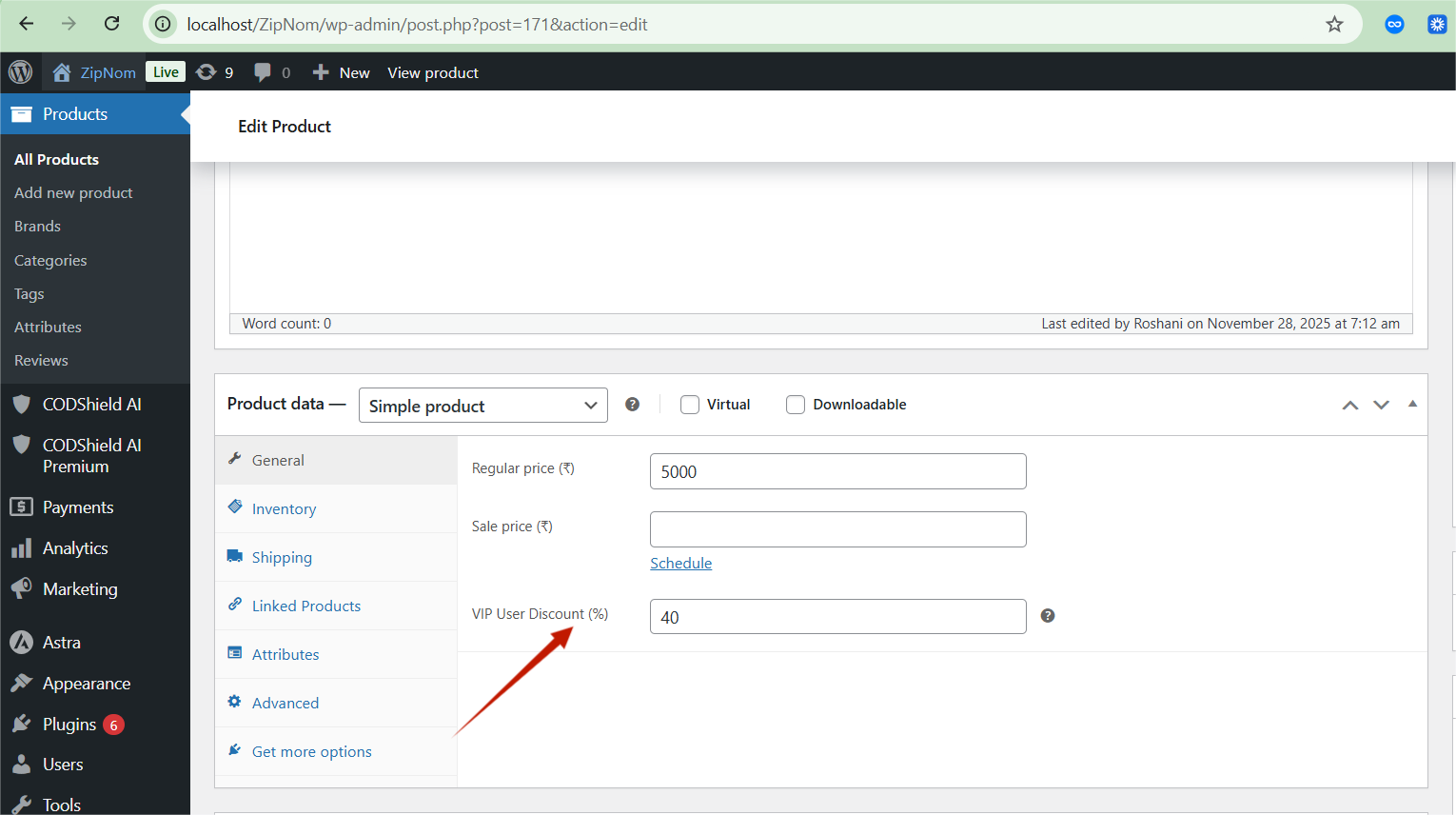
How to set:
- Edit any product in WooCommerce
- Scroll to Product Data → General
- Find VIP User Discount (%)
- Enter percentage (e.g., 20 for 20% OFF)
- Update product
Priority: Product-specific discount ALWAYS overrides global discount
How Customers Get the Discount #
Step-by-Step Customer Experience: #
- Customer abandons cart → Receives WhatsApp message
- Message contains link: “Complete your purchase with 15% OFF”
- Customer clicks link → Goes directly to checkout
- Discount automatically applied → Shows in cart total
- Customer sees savings → Detailed breakdown displayed
What the Customer Sees: #
text
- 🛒 YOUR CART
- ─────────────────────
- Premium T-Shirt × 2 ₹3,998
- Jeans × 1 ₹2,499
- ─────────────────────
- Subtotal ₹6,497
- 🎉 VIP DISCOUNT APPLIED!
- Premium T-Shirt (2) -15%: -₹600
- Jeans (1) -15%: -₹375
- ─────────────────────
- Total VIP Savings: -₹975
- Order Total ₹5,522
─────────────────────
VIP Discount Rules #
| Rule | Details |
| Who gets it? | Only customers with UBS score ≥70% (VIP category) |
| How long is it valid? | 24 hours from WhatsApp link click |
| Can it be combined? | Works with other WooCommerce coupons? No, it’s a separate discount |
| Is it stackable? | One discount per product (highest percentage wins) |
Smart Message Timing #
Why Timing Matters #
Send too fast → Customer feels pressured
Send too late → Customer lost interest
Send at the right time → Maximum conversion
Default Timing Strategy #
| Customer Type | Wait Time | Why? |
| VIP/Low Risk | 5 minutes | Strike while iron is hot – they’re ready to buy |
| Medium Risk | 30 minutes | Give them time to comparison shop, then remind |
| High Risk | 60 minutes | Let them think about it, then offer assistance |
ROI Dashboard Explained #
Your Command Center #
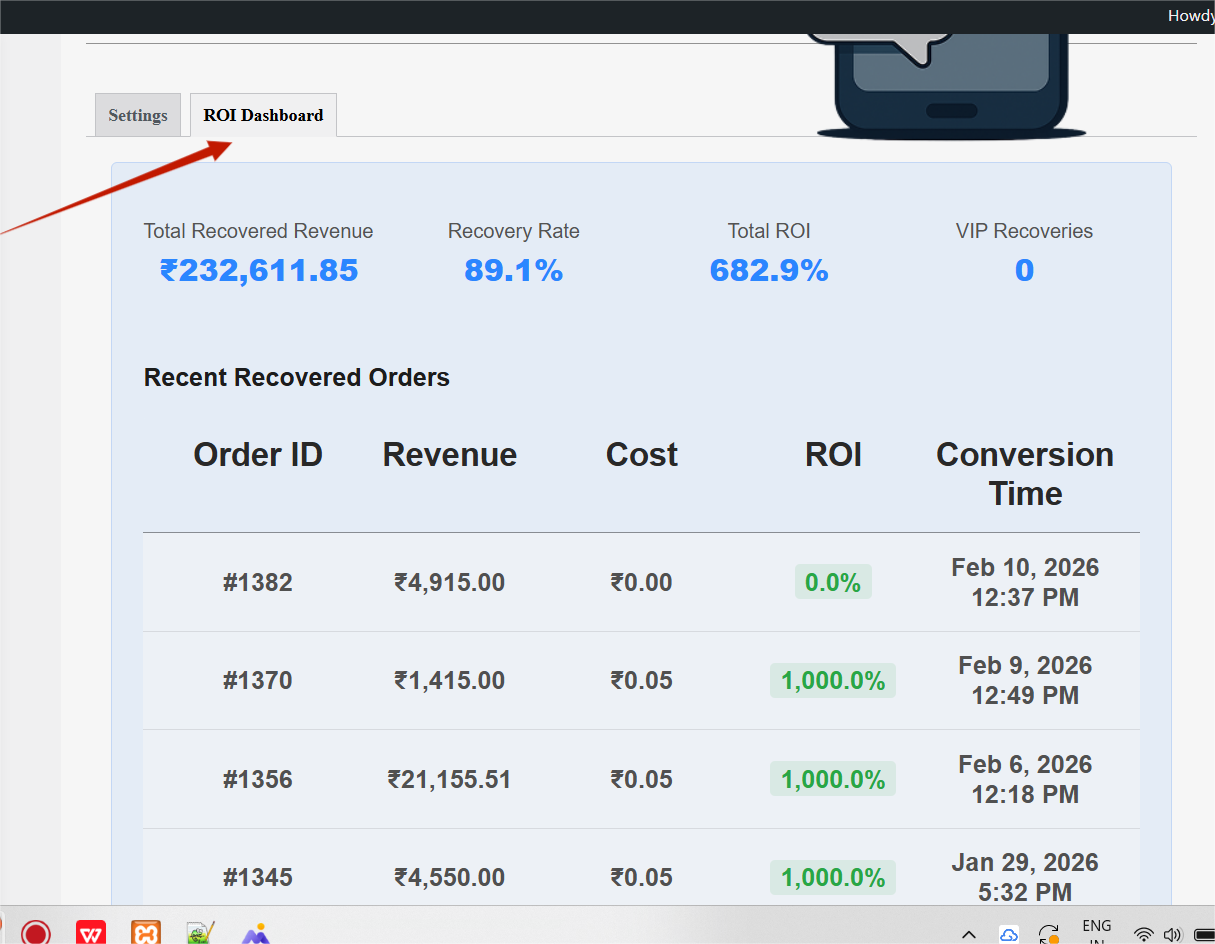
The ROI Dashboard shows you exactly how much money you’re recovering and what your return on investment is.
Dashboard Components #
1. Key Metrics Cards #
text
- ┌────────────────────┐ ┌────────────────────┐
- │ TOTAL RECOVERED │ │ RECOVERY RATE │
- │ REVENUE │ │ │
- │ ₹2,32,611.85 │ │ 89.1% │
- │ All-time recovered │ │ 89 of 100 carts │
- │ sales │ │ are recovered │
- └────────────────────┘ └────────────────────┘
- ┌────────────────────┐ ┌────────────────────┐
- │ TOTAL ROI │ │ VIP RECOVERIES │
- │ │ │ │
- │ 682.9% │ │ 0 │
- │ ₹682 recovered │ │ VIP discount │
- │ per ₹1 spent │ │ orders │
└────────────────────┘ └────────────────────┘
What Each Metric Means:
| Metric | Definition | Good | Great | Excellent |
| Recovered Revenue | Total ₹ from recovered carts | ₹50,000+ | ₹1,00,000+ | ₹2,00,000+ |
| Recovery Rate | % of abandoned carts recovered | 20% | 40% | 60%+ |
| ROI | Return on WhatsApp spend | 500% | 1000% | 2000%+ |
| VIP Recoveries | Orders with VIP discount | Any | 10+ | 50+ |
2. Recent Recovered Orders Table #
text
- ┌─────────┬────────────┬────────┬──────────┬────────────────────┐
- │ ORDER # │ REVENUE │ COST │ ROI │ CONVERSION TIME │
- ├─────────┼────────────┼────────┼──────────┼────────────────────┤
- │ #1382 │ ₹4,915.00 │ ₹0.00 │ 0.0% │ Feb 10, 2026 12:37 │
- │ #1370 │ ₹1,415.00 │ ₹0.05 │ 1,000.0% │ Feb 9, 2026 12:49 │
- │ #1356 │ ₹21,155.51│ ₹0.05 │ 1,000.0% │ Feb 6, 2026 12:18 │
- │ #1245 │ ₹4,550.00 │ ₹0.05 │ 1,000.0% │ Jan 29, 2026 17:32 │
└─────────┴────────────┴────────┴──────────┴────────────────────┘
Understanding ROI in the Table:
- 1000% ROI means: For every ₹1 spent on WhatsApp, you recovered ₹10
- 0.0% ROI means: Message cost was ₹0 (test message or free tier)
3. Recovery Progress Tracker #
This is your real-time recovery dashboard. Every abandoned cart appears here with its current status.
Filter Tabs:
- All – Every cart in the system
- Recovered – Successfully converted to orders
- Abandoned – Still waiting to be recovered
- Message Sent – WhatsApp delivered, waiting for click
- Link Clicked – Customer clicked, likely to buy
Cart Cards Explained:
text
- ┌────────────────────────────────────────────────────┐
- │ RECOVERED Status Badge │
- │ │
- │ Cart #173 ₹23,146.06 │
- │ 3 items │
- │ │
- │ Visitor: cs_6f4b0… │
- │ Last Activity: Feb 10, 2026 5:12 PM │
- │ │
- │ ✓ WhatsApp message sent │
- │ ✓ Recovery link clicked │
└────────────────────────────────────────────────────┘
Status Badge Colors:
- 🟢 Recovered – Order completed! Money in bank
- 🟡 Abandoned – Waiting for recovery
- 🔵 Message Sent – WhatsApp delivered
- 🟣 Link Clicked – Customer interested
Daily Reports & Analytics #
What Gets Tracked #
Per Order: #
- Order ID and amount
- WhatsApp message cost
- ROI percentage
- Conversion time
- VIP discount usage
Daily Aggregates: #
- Total abandoned carts
- Total recovered carts
- Recovery rate percentage
- Total revenue recovered
- Total message costs
- Average ROI
- VIP recoveries count
Exporting Data #
Currently, data is viewable in the dashboard. Export functionality coming soon.
Testing Your Setup #
Why Test? #
Never send real WhatsApp messages to customers without testing first!
Test Message Feature #
Step 1: Enter Your Test Number #
Use a WhatsApp-enabled number you have access to: text
Test Phone Number: +919106836858
Step 2: Choose Test Type #
- Test VIP Message
- Tests VIP template with discount information
- Includes discount amount in message
- Use this most often
- Test Medium Risk
- Tests medium risk template
- Urgency-focused messaging
- No discount included
- Test High Risk
- Tests high risk template
- Assistance-focused messaging
- No discount included
Step 3: Check Results #
Success:
text
- ✅ Test message sent successfully!
- Message SID: SMxxxxx…
- Status: sent
- To: +919106836858
Template: VIP Discount Template
Failure:
text
- ❌ Error: Invalid phone number format
Use format: +919106836858
Common Test Issues & Fixes #
| Issue | Cause | Fix |
| “Invalid phone number” | Wrong format | Use +919106836858 (India) |
| “Not authorized” | Number not in sandbox | Join Twilio Sandbox first |
| “Template error” | Wrong parameter count | VIP needs 4 params, others 3 |
| “Authentication failed” | Wrong credentials | Re-enter Account SID & Auth Token |
Frequently Asked Questions #
❓ Do customers need to have WhatsApp installed? #
Yes. The message is sent to their WhatsApp account. If they don’t have WhatsApp, they won’t receive it.
❓ Does this work internationally? #
Yes. Twilio WhatsApp works in 180+ countries. Phone numbers are automatically formatted with the correct country code.
❓ How much does this cost? #
Twilio costs: $0.005 – $0.05 per message (varies by country)
Plugin cost: Included in CODShield AI Premium license
❓ Can I use my own WhatsApp Business number? #
Yes. Once your Twilio account is approved for WhatsApp Business API, you can use any verified number.
Technical Questions #
❓ How is cart abandonment detected? #
The plugin tracks cart activity. If a customer adds items but doesn’t complete checkout for 10 minutes, the cart is marked as abandoned.
❓ What if a customer abandons multiple times? #
Each abandonment triggers a new message. However, the UBS score adjusts based on behavior.
❓ Do you track guest checkout customers? #
Yes. Using a unique visitor cookie that lasts 365 days. Even without an account, we can recognize returning guests.
❓ What happens if Twilio is down? #
Messages remain in the queue. When Twilio is back online, they will be sent at their scheduled times.
VIP Discount Questions #
❓ Can customers share the discount link? #
Yes, but it won’t work. The discount is tied to their specific visitor ID. A shared link won’t apply discounts for others.
❓ Do VIP discounts expire? #
Yes, after 24 hours. This creates urgency and prevents discount abuse.
❓ Can I set different discounts for different products? #
Yes. Edit any product and set “VIP User Discount (%)” in the product data section.
❓ Do discounts work with coupons? #
VIP discounts are applied as a separate line item. They work alongside coupons unless the coupon conflicts.
Reporting Questions #
❓ Why is my ROI 1000%? #
That’s excellent! It means for every ₹1 spent on WhatsApp, you recovered ₹10 in sales.
❓ Why are some costs ₹0.00? #
Test messages or messages sent during Twilio free trial have no cost.
❓ Why is my VIP Recoveries count 0? #
You haven’t configured VIP discounts or VIP customers haven’t clicked the recovery link yet.


