

1. Plugin Overview #
COD Shield AI is an advanced WooCommerce & WhatsApp-based customer communication and fraud prevention plugin designed to:
- Reduce COD fraud
- Automate WhatsApp conversations using AI (OpenAI)
- Enable human handover live chat
- Send WhatsApp & email notifications
- Improve order confirmation & recovery
- Centralize customer communication inside WordPress
The plugin works directly from the WordPress Admin Dashboard and integrates seamlessly with WhatsApp Business API, OpenAI, WooCommerce, and Email systems.
2. Plugin Navigation (Admin Menu) #
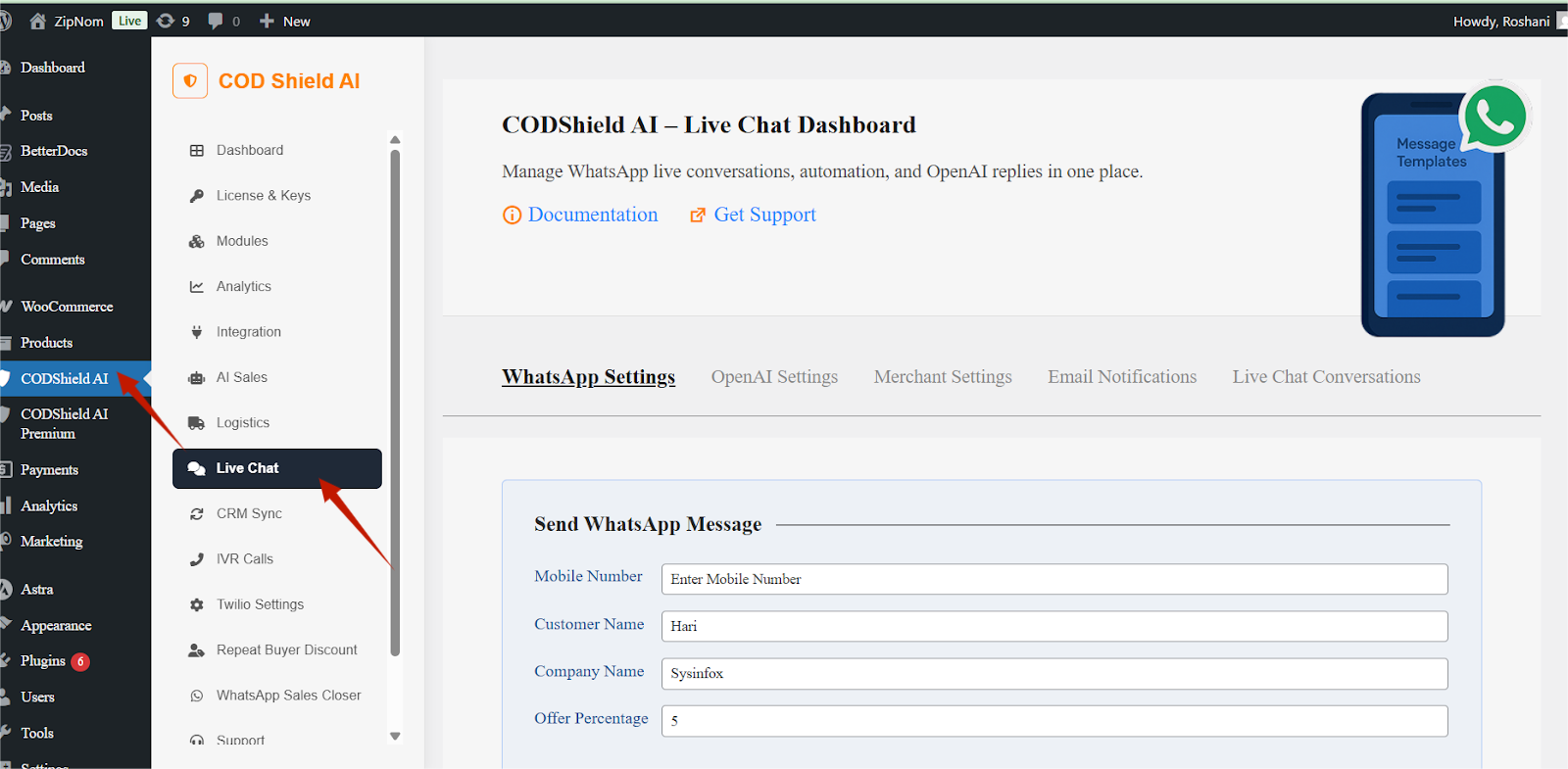
After activation, the plugin appears in the WordPress admin sidebar as:
Dashboard -> COD Shield AI -> Live Chat
3. Live Chat Module (Core Feature) #
The Live Chat section allows store owners to send, receive, automate, and manage WhatsApp conversations from WordPress.
4. WhatsApp Settings Tab #
Purpose #
Used to send WhatsApp messages manually and verify WhatsApp Business connectivity.
Available Fields #
| Field | Description |
| Mobile Number | Customer WhatsApp number (with country code) |
| Customer Name | Name of the recipient |
| Company Name | Business or store name |
| Offer Percentage | Discount or offer percentage to include in message |
Action #
Send WhatsApp Message
Sends a real-time WhatsApp message to the entered number using the configured WhatsApp Business account.
Production Status Section #
Displays WhatsApp Business account status:
- WhatsApp Business Number
- Account Status (Online)
- Quality Rating (High)
- Messaging Limits (Unlimited)
✅ Confirms production environment (not sandbox)
5. OpenAI Settings Tab #
Purpose #
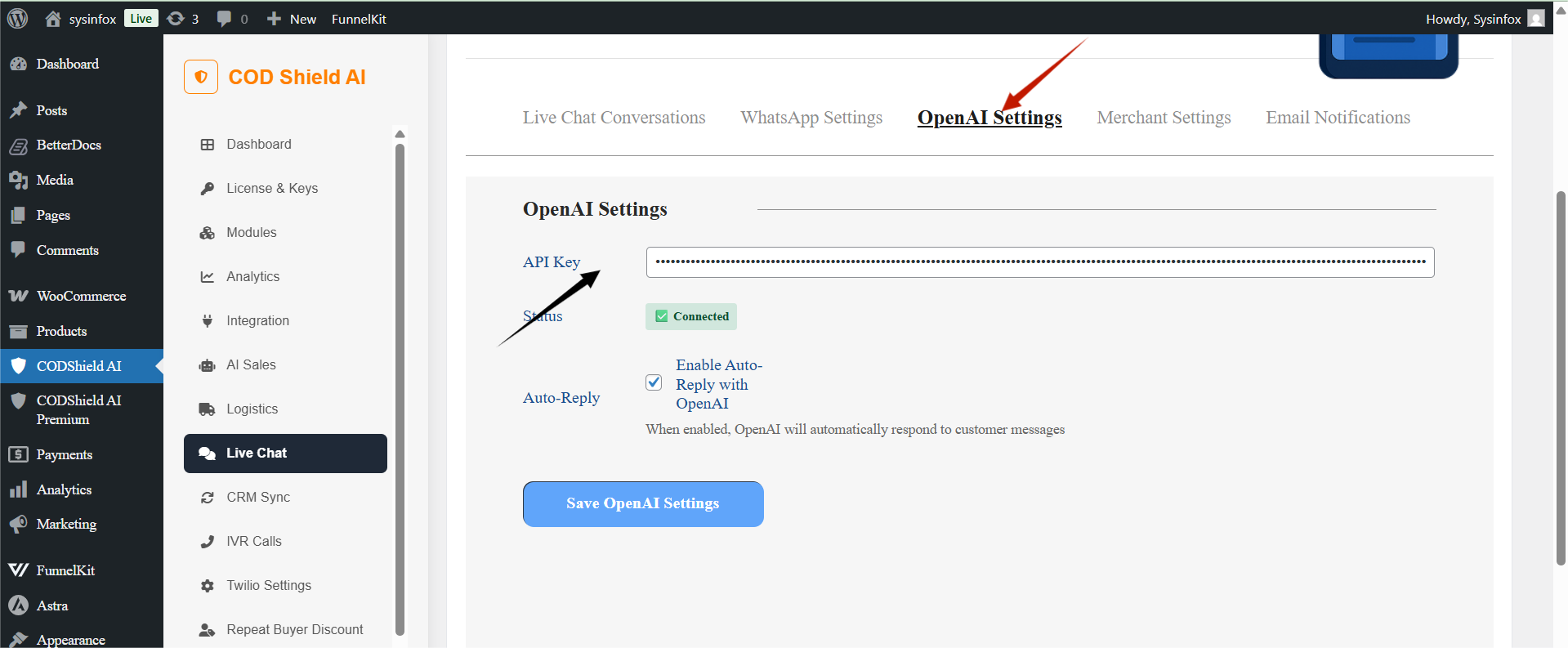
Controls AI-powered auto-reply system for WhatsApp live chat.
Settings #
API Key #
- Enter your OpenAI API key
- Required for AI auto-responses
Connection Status #
- Shows Connected / Disconnected
- Confirms OpenAI integration is active
Auto-Reply Toggle #
Enable Auto-Reply with OpenAI
- When enabled, customer messages receive AI-generated replies automatically
- Works only if no human agent replies manually
Save Button #
Save OpenAI Settings
6. Merchant Settings Tab #
Purpose #
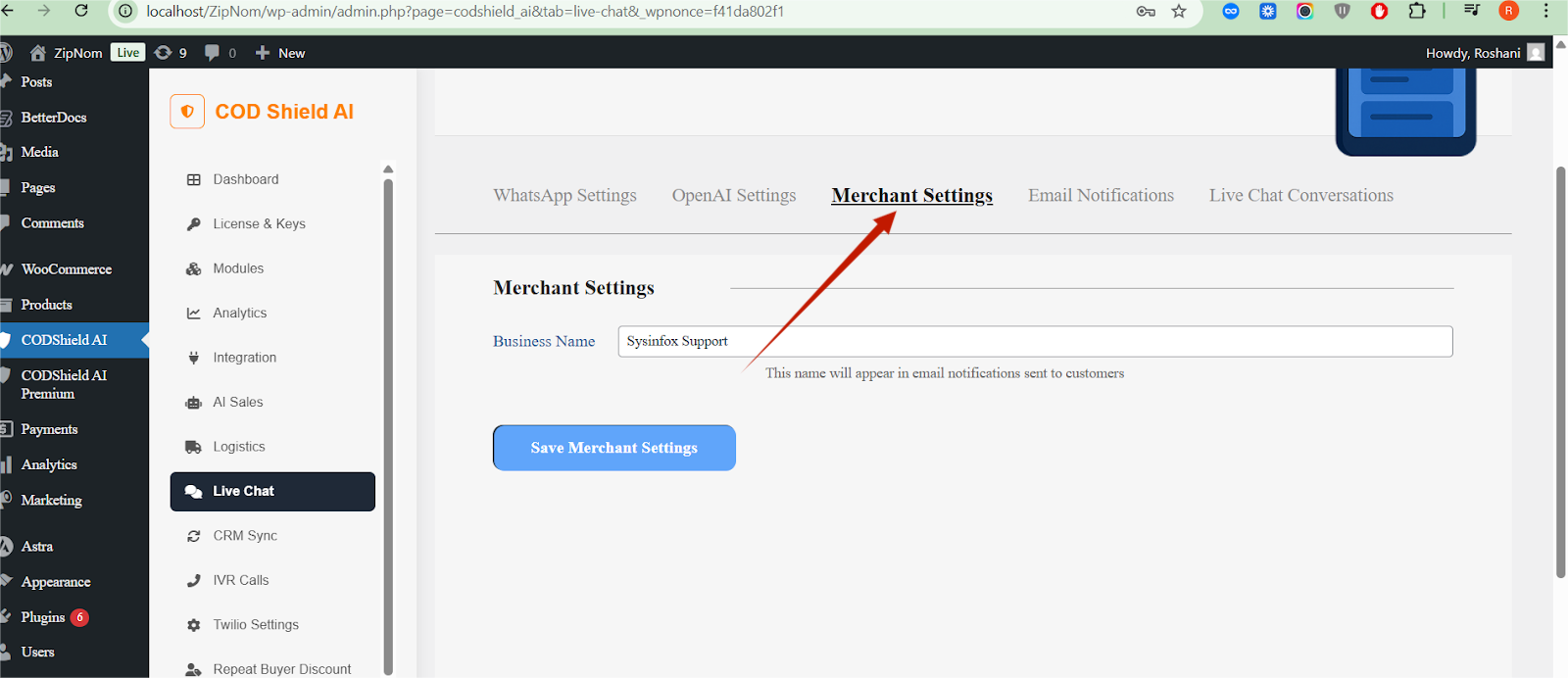
Defines business identity used in emails and chat communication.
Setting #
| Field | Description |
| Business Name | Name shown in email notifications |
Example : Sysinfox Support
Save Button #
Save Merchant Settings
7. Email Notifications Tab #
Purpose #
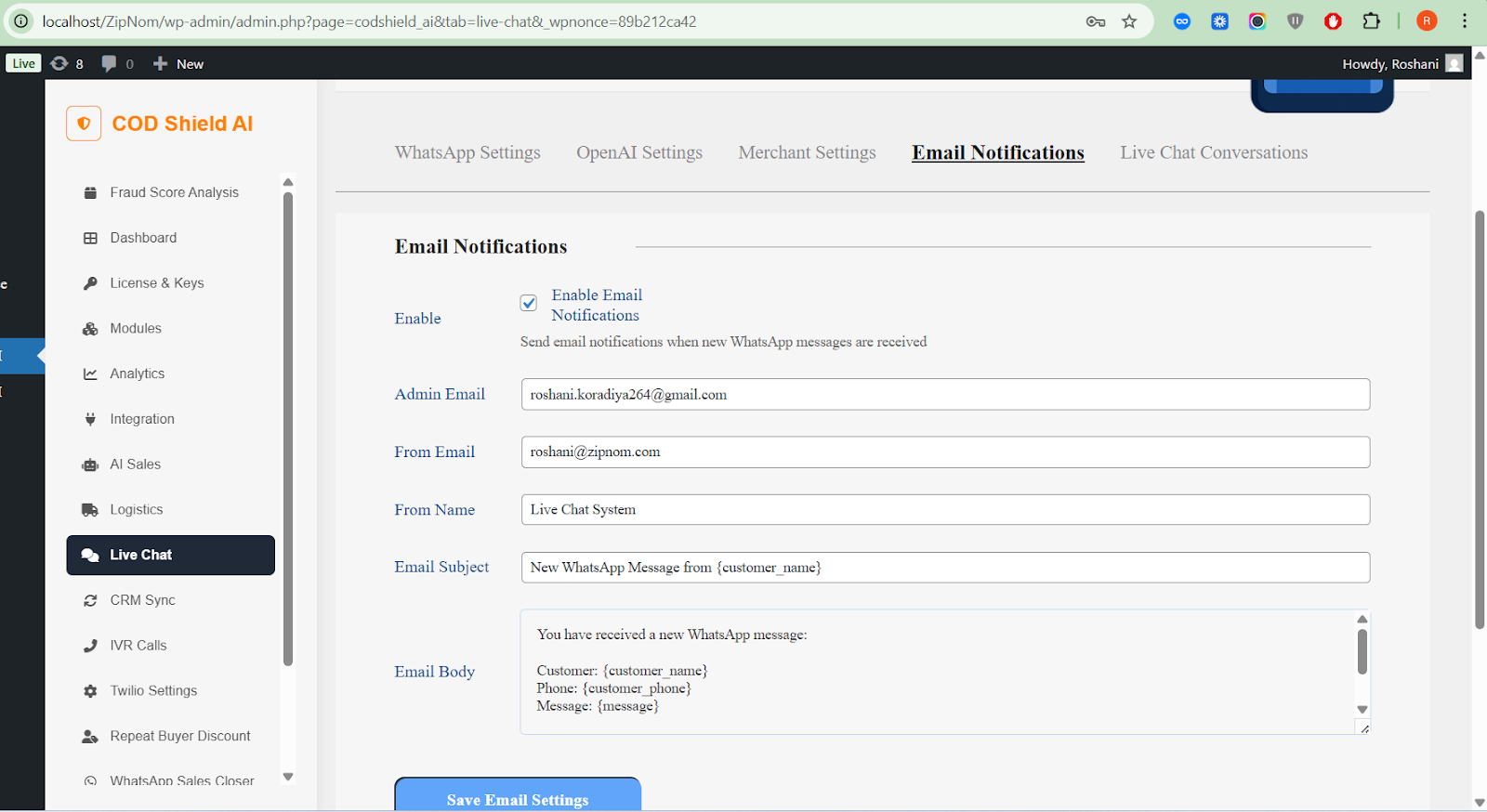
Send email alerts to admin when a new WhatsApp message is received.
Enable Email Notifications #
Checkbox:
- Enables or disables email notifications
Email Configuration Fields #
| Field | Description |
| Admin Email | Email where notifications are sent |
| From Email | Sender email address |
| From Name | Display name of sender |
| Email Subject | Supports dynamic placeholders |
| Email Body | Fully customizable message |
Supported Placeholders #
| Placeholder | Meaning |
| {customer_name} | Customer name |
| {customer_phone} | Customer phone number |
| {message} | WhatsApp message content |
Save Button #
Save Email Settings
8. Live Chat Conversations Tab #
Purpose #
Central WhatsApp Live Chat Dashboard inside WordPress.
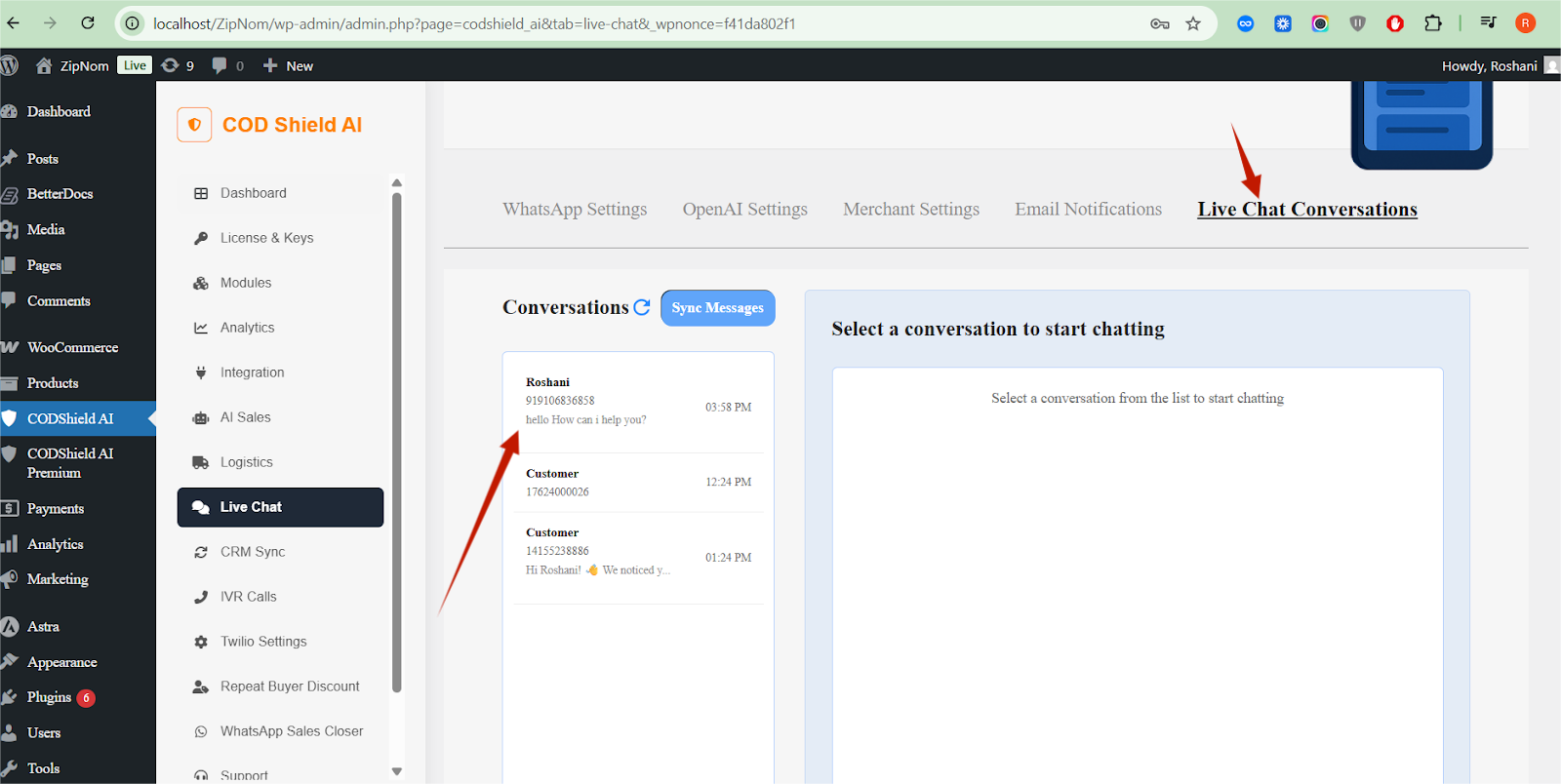
Conversation Panel (Left Side) #
Displays:
- Customer Name / Number
- Last message preview
- Message timestamp
Controls #
- 🔄 Sync Messages – Fetch latest WhatsApp messages
- Click conversation to open chat
Chat Window (Right Side) #
Features:
- Full message history
- Timestamped messages
- Human replies
- AI replies (if enabled)
Send Message #
Admins can manually reply to customers directly from WordPress.
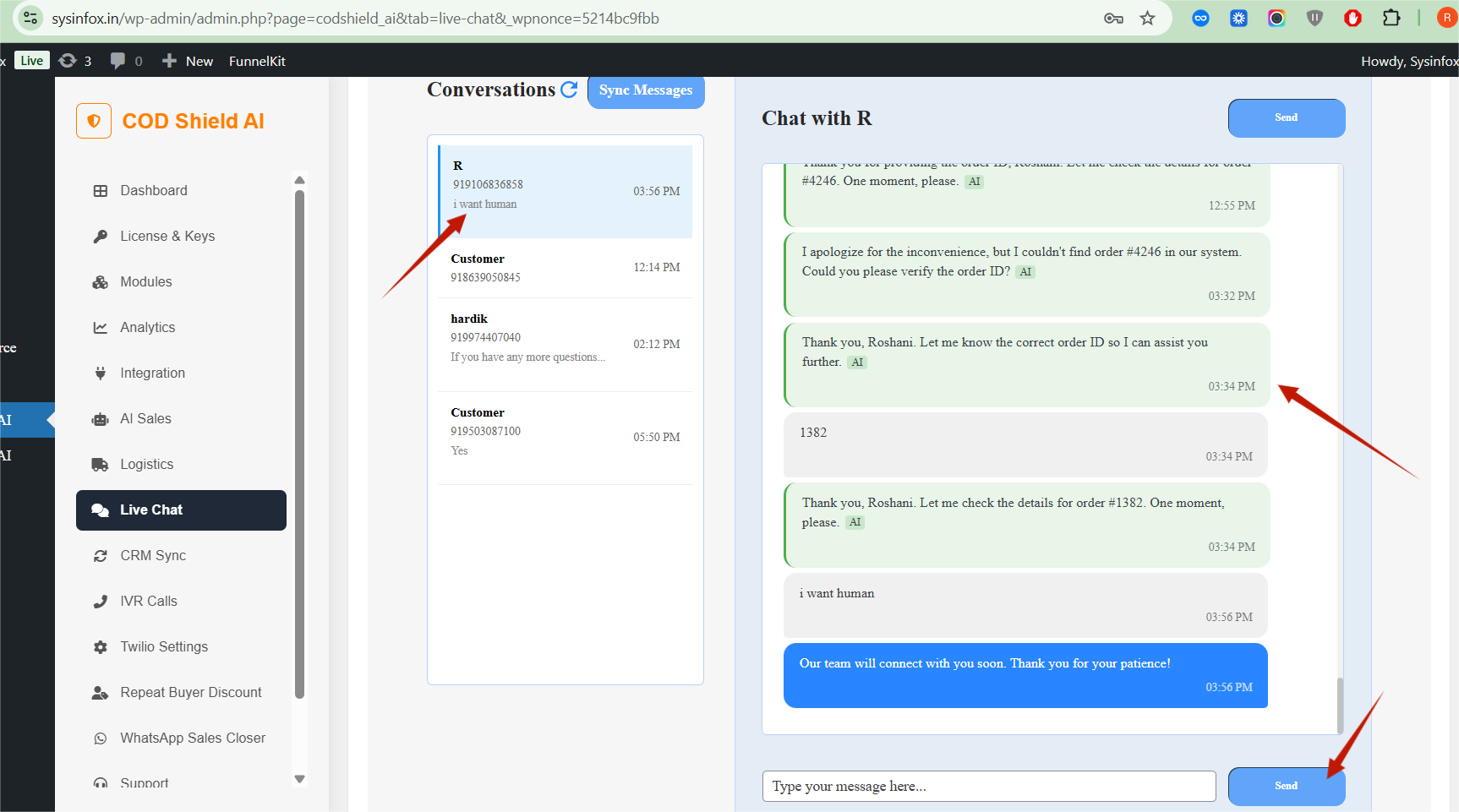
🧠 When a human replies, AI auto-reply pauses (human handover).
9. AI + Human Handover Logic #
| Scenario | Behavior |
| AI enabled & no agent reply | OpenAI sends replies automatically |
| Agent replies manually | AI pauses for that conversation |
| New customer message | AI resumes only if no human activity |
This ensures natural human-like support without conflicts.
10. Security & Permissions #
- Uses WordPress nonces for security
- Only accessible to Admin / Shop Manager
- No frontend exposure of keys
- API keys stored securely in WP options
11. WooCommerce Integration (Implicit) #
- Designed for COD order workflows
- Works with:
- Abandoned checkout follow-ups
- Order confirmation
- Offer-based recovery
- Repeat buyer incentives
12. Benefits of COD Shield AI #
✅ Reduce COD fraud
✅ Automate customer engagement
✅ Increase order confirmations
✅ Save human support time
✅ Centralized WhatsApp inbox
✅ AI + Human hybrid support
✅ Production-ready WhatsApp API
13. Recommended Use Cases #
- COD order verification
- Abandoned cart recovery
- Customer support via WhatsApp
- AI sales assistant
- Admin alert system
- Offer-based conversions


